Build small launcher tools without turning the launcher into an IDE.
Lua modules are Re:T-UI-owned surfaces for quick, inspectable tools. Lua gives regular users a native scripting layer for timers, todos, notes, status panels, module buttons, config forms, app/intent shortcuts, and command suggestions without needing Termux plumbing.
Keep preview, config, and source editing separate.
A Lua module has a live launcher surface, optional config UI, and a script editor path. Those surfaces should stay separate so the launcher remains predictable instead of becoming a tangle of custom mini-apps.
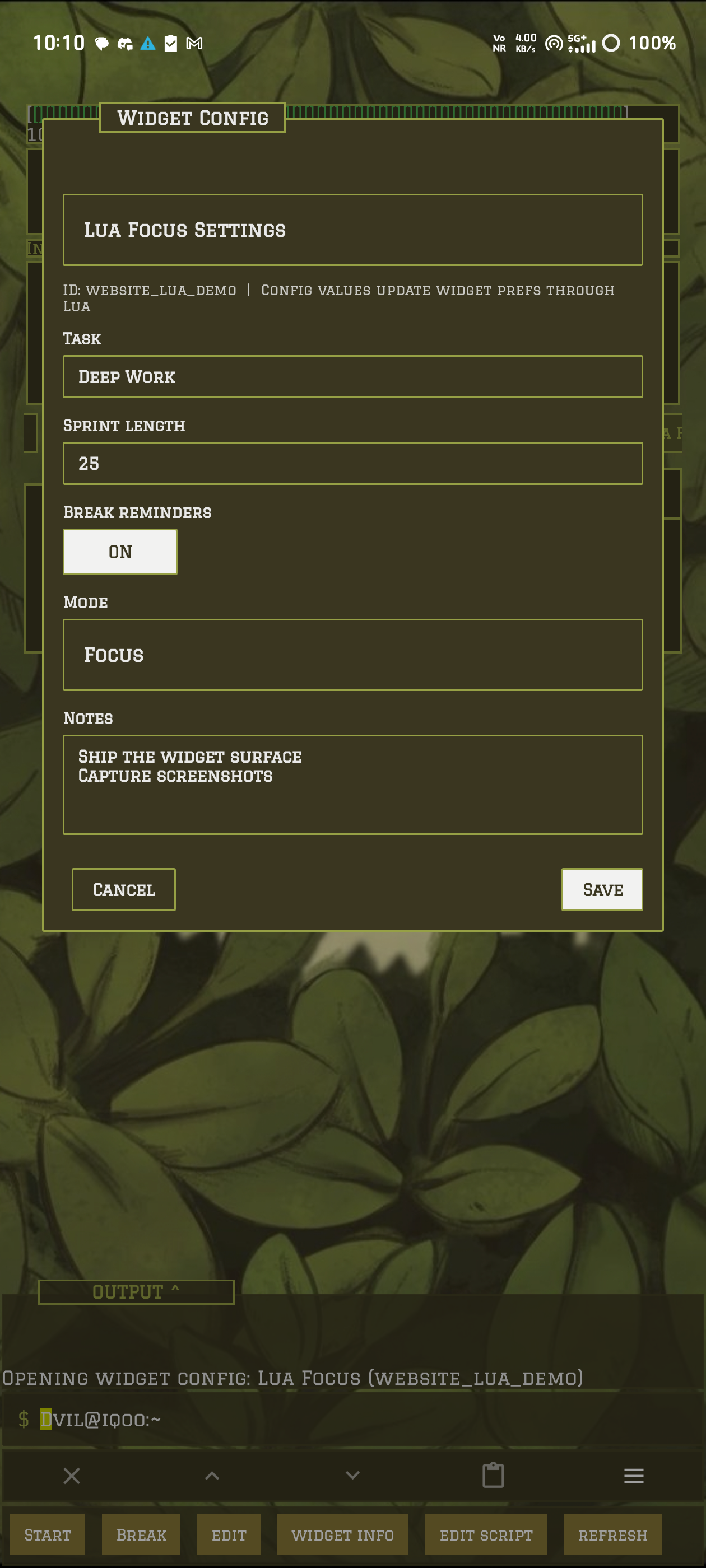
ui:show_text, ui:render, native buttons, rows, containers, tables, or progress.ui:show_config. Use it for user-editable values.module -edit <id> or the edit script chip.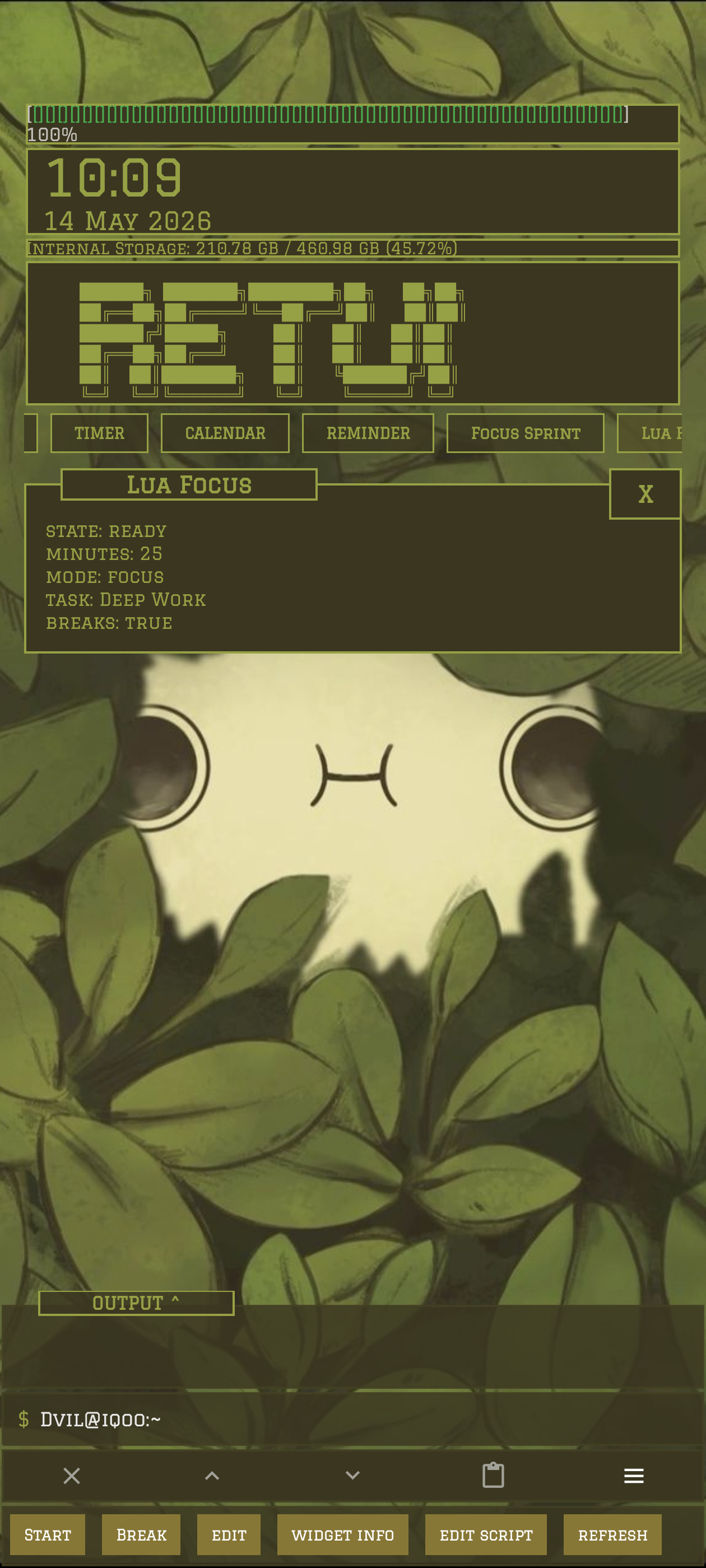
The root module command is the public gateway.
Everything visible in the dock is a module. Use module for Lua creation, editing, config, validation, approval, and refresh. The older widget command remains as a compatibility alias for existing scripts and shared packages.
| Command | Use it for | Surface rule |
|---|---|---|
module -ls |
List known modules, the dock order, and locally saved Lua modules. | High-intent root chip. |
module -new lua <name> |
Create a Lua module and open the editor with starter Lua. | High-intent root chip. |
module -show <id> |
Open a Lua module as the active dock panel. | High-intent root chip. |
module -config <id> |
Open the Lua module config form when the script declares one. | High-intent root chip; active Lua modules expose this as edit. |
module -edit <id> |
Open the Lua source editor. | High-intent root chip; active Lua modules expose this as edit script. |
module -check <id> |
Load and render once, reporting metadata, schema, or runtime errors. | Advanced chip after narrowing, also shown on error surfaces. |
module -refresh <id> |
Manually re-render a saved Lua module. | Advanced/manual path. Active Lua modules refresh when shown, and tapping the module title forces a refresh. |
widget -rm <id> |
Legacy package deletion for a locally saved Lua module. | Compatibility path while the public module command owns day-to-day work. |
$ module -new lua focus_sprint
              $ module -check focus_sprint
              $ module -show focus_sprint
              $ module -config focus_sprint
              $ module -edit focus_sprint
Start with a tiny durable script.
A good first Lua module should render a small body, expose one or two buttons, and keep state in prefs. That proves the lifecycle without dragging in networking, files, or complex config.
Create
Run module -new lua counter, paste the script, then Save/Run.
Validate
Run module -check counter before treating it as a daily tool.
Open
Run module -show counter. The panel stays clean while suggestion chips call on_action(value).
Counter Lua module
-- name = "Counter"
              -- type = "module"
              -- retui = "1"

              local prefs = require "prefs"

              local function render()
                  if prefs.count == nil then prefs.count = 0 end
                  ui:set_title("Counter")
                  ui:show_kv({ count = prefs.count })
                  ui:suggest_action("+1", "inc")
                  ui:suggest_action("Reset", "reset")
              end

              function on_resume()
                  render()
              end

              function on_action(action)
                  if action == "inc" then prefs.count = prefs.count + 1 end
                  if action == "reset" then prefs.count = 0 end
                  render()
              end
Lua declares the form; Re:T-UI owns the UI.
Use config for user-editable values such as task names, intervals, units, display preferences, note bodies, todo text, and module modes. Runtime module buttons belong in the live preview surface; runtime suggestion chips belong in the launcher suggestion row.
Declare fields
function on_config()
                  ui:show_config({
                      title = "Focus Settings",
                      fields = {
                          { id = "task", label = "Task", type = "text", value = prefs.task, required = true },
                          { id = "minutes", label = "Sprint length", type = "number", value = prefs.minutes, min = 1, max = 180 },
                          { id = "breaks", label = "Break reminders", type = "toggle", value = prefs.breaks },
                          { id = "mode", label = "Mode", type = "select", value = prefs.mode, options = {
                              { value = "focus", label = "Focus" },
                              { value = "study", label = "Study" },
                              { value = "writing", label = "Writing" },
                          } },
                          { id = "notes", label = "Notes", type = "textarea", value = prefs.notes or "", lines = 6 },
                      }
                  })
              end
Save intentionally
function on_config_submit(action, values)
                  if action == "save" then
                      prefs.task = values.task
                      prefs.minutes = values.minutes
                      prefs.breaks = values.breaks
                      prefs.mode = values.mode
                      prefs.notes = values.notes
                  end
                  render()
              end
Cancel and back should not mutate module state. Save mutates only through on_config_submit(action, values), then the module renders again.
Text
Single-line string input for labels, queries, names, and short values.
Number
Integer or decimal input with optional min and max.
Toggle
Boolean on/off state submitted as a Lua boolean.
Select
One string value from a declared option list.
Textarea
Multiline string input. Newlines are preserved.
Scroll
The panel grows toward the top margin and scrolls fields when there are many of them.
Buttons and suggestions are separate surfaces.
Lua modules can render clickable controls directly inside the module panel, or they can publish suggestion chips for keyboard-first use. Use module buttons for always-visible controls and suggestion chips when the panel should stay clean.
ui:button(label) maps to on_click(index).ui:command_button and ui:module_button run launcher commands from the module.ui:suggest_action, ui:suggest_command, ui:suggest_module, and ui:suggest_text add suggestion-row chips without adding module buttons.ui:app_button, ui:intent_button, and ui:shortcut_button require declared permissions and route through Re:T-UI commands.progress, divider, pre, ascii, and code layout objects stay monospace.Control snippet
-- permissions = "apps,intents"

              function render()
                  ui:set_title("Control Pad")
                  ui:render({
                      { type = "text", text = "Launcher-native controls" },
                      { type = "progress", label = "Done", value = 2, max = 5, width = 8 },
                      { type = "pre", text = "CPU  [####....] 50%" },
                  })
                  ui:button("+1")
                  ui:command_button("Modules", "module -ls")
                  ui:app_button("Settings", "Settings")
                  ui:intent_button("Open Web", { view = "https://example.com" })
              end
Use prefs for settings, files for user content.
Lua modules live under Re:T-UI's local widgets/<id>/ storage folder for compatibility and are included in personal backup/restore. Keep small settings in prefs. Put larger notes, logs, JSON blobs, and user-generated text in module-local files.
Notes module storage
local prefs = require "prefs"
              local files = require "files"

              function save_notes(text)
                  prefs.last_saved = os.time()
                  files:write("notes.txt", text)
              end

              function load_notes()
                  if files:exists("notes.txt") then
                      return files:read("notes.txt")
                  end
                  return ""
              end
Not every Lua script needs to become a dock module.
Lua suggestion scripts use -- type = "suggest". They are installed locally like Lua modules, but they do not render into the dock. They add suggestion chips while the user types at the root prompt.
Suggestion script
-- name = "Quick Config"
              -- type = "suggest"
              -- retui = "1"

              local strings = require "strings"
              local fmt = require "fmt"

              function on_suggest(query)
                  local q = strings.trim(fmt.lower(query))
                  if strings.starts_with(q, "cfg") then
                      suggest:command("Open settings", "settings")
                      suggest:command("Edit behavior", "config -file behavior.xml")
                      suggest:command("Theme colors", "settings appearance theme")
                  end
              end
Use this when
ui:suggest_*. If users only need command hints, make a suggestion script.Use the smallest API surface that solves the module.
Lifecycle
on_load, on_resume, on_click(index), on_action(value), on_dialog_action(index), on_tick(n), on_alarm, on_config, on_config_submit.
Render
ui:set_title, ui:show_text, ui:render, ui:layout, ui:show_lines, ui:show_kv, ui:show_table, ui:show_buttons, ui:button, ui:show_action, ui:show_command, ui:suggest_action, ui:suggest_command, ui:suggest_module, ui:suggest_text.
Panels
ui:set_expandable, ui:is_expanded, ui:expand, ui:collapse, ui:toggle, ui:show_progress_bar(label, current, max, width), ui:set_progress.
Storage
prefs for small persistent values. files for module-local text files. json for encoding and decoding structured data.
Helpers
launcher, date, fmt including bounded Unicode progress_bar(value, max, width), clock for timer, stopwatch, and Pomodoro state, strings, colors, debug, system, and aio cover common launcher-safe work.
Launcher Buttons
apps:list, apps:find, apps:launch_command, intents:view, intents:activity, shortcuts:use_command, and their button helpers create visible launcher/app actions.
Reminders
reminders:daily(id, title, "HH:MM"), reminders:once(id, title, "yyyy-mm-dd HH:MM"), reminders:cancel(id), and reminders:cancel_prefix(prefix) schedule local notifications and require declared permission.
Network
http:get, http:post, http:put, and http:delete return through network callbacks and require declared permission.
Lua is launcher-native, not a general shell escape.
The runtime uses a Re:T-UI-owned Lua environment. Scripts can use safe Lua basics plus the Lua module APIs, not arbitrary Java, shell execution, package loading, or global filesystem access. Shell automation belongs in Termux modules.
| Permission | What it allows | Notes |
|---|---|---|
network |
HTTP requests through the Lua http helper. |
Responses are size-limited to protect launcher memory. |
clipboard |
Read or write clipboard helpers exposed by Re:T-UI. | Use only when the module clearly needs clipboard behavior. |
vibrate |
Trigger launcher vibration feedback. | Keep it sparse; modules should not become noisy. |
local-files |
Use module-local files through files. |
No global filesystem access. |
active-tick |
Run on_tick(n) while the Lua module is the active open module. |
Intervals are clamped; use this for visible live state only. |
notifications |
Schedule local notifications through the Lua reminders helper. |
Use stable ids so modules can replace or cancel their own reminders. |
apps |
List launchable apps and create app-launch buttons through the Lua apps helper. |
Routes through explicit Re:T-UI launch commands. |
intents |
Create view/activity intent buttons through the Lua intents helper. |
Android may still block unsafe or unavailable targets. |
shortcuts |
Create buttons for pinned or app shortcuts through the Lua shortcuts helper. |
Shortcut availability depends on the target app and Android version. |
-- permissions = "network,clipboard,local-files,active-tick,vibrate,notifications,apps,intents,shortcuts"
              -- retui = "1"
Reality check: Lua modules should stay small. If a script needs background daemons, Linux CLIs, Android shell access, or heavy parsing, build a Termux-backed module and let the Lua surface remain light.