The Launcher needed to let files become their own app.
The original T-UI experience could manage files. I wanted to keep that feeling, but modern Android is very clear about broad storage access, especially for a launcher. The honest answer was not to hide more file-manager machinery inside Launcher. It was to give the work a proper home.

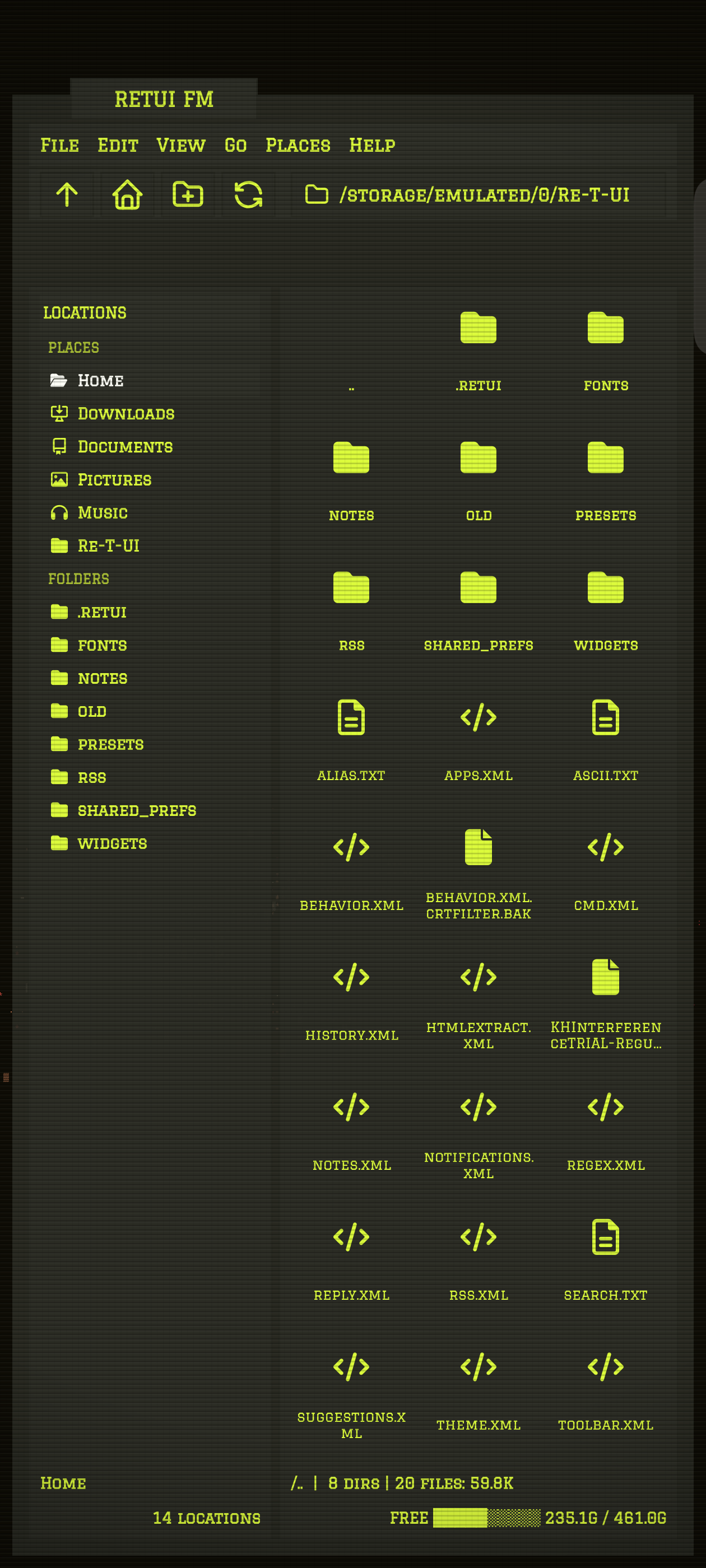
Yellow means this is a different responsibility
RETUI Files is not a Launcher popup with another title bar. It is a standalone local file manager, package `com.dvil.retui.fm`, with its own storage permissions, release cycle, and interface. That boundary is part of the product.
Launcher stays the command desk. Files owns browsing, previews, editing, sharing, copying, moving, archiving, and deletion. The two apps can still feel related without pretending they have the same job.
The handoff should feel like one thought
From Launcher, `files` opens the standalone app and passes the current directory. It also sends the current RETUI colours, terminal background, typeface, text sizes, margins, corner treatment, cyberdeck mode, and CRT setting.
files
files -search invoice pdf
files -open Downloads
files screenshots image
`files -open` resolves relative directories from the Launcher's current path. A plain name remains the older search shorthand. The modern handoff uses structured Android intent extras, so Files receives an action and values rather than having to reinterpret a command string.
The result is continuity without coupling. Files can also run on its own with sensible defaults, but entering through Launcher carries the screen you already built with you.
I did not want a terminal that punished touch
The main file view uses two panes: locations and folders on the left, the current directory as a grid on the right. Directories expand into the flow, and an address bar gives the current path somewhere visible to live.
Tap works. Long-press works. Arrow keys, Enter, Tab, Home, End, and page movement work too. This is still a phone application, and making touch deliberately awkward would not make it more terminal-like. It would only make it awkward.
HomeCategories, phone storage, recently deleted items, saved places, and recent directories.
TreeA focused two-pane view for moving through the actual directory structure.
CategoriesImages, videos, audio, documents, APKs, and archives collected through Android's media index.
PlacesHome, Downloads, Documents, Pictures, Music, plus folders you add yourself.
Preview first, leave when you need the real app
RETUI Files can preview bounded text, Markdown, JSON, CSV, ZIP contents, directories, and images. Text-like previews are capped at 64 KiB so opening one surprising file does not turn a quick look into a memory problem.
Small text-like files can be edited inline. Other files use Android's normal `Open with` route, and shareable files use Android sharing through a scoped `FileProvider` URI.
preview notes.md
edit notes.md
open report.pdf
share report.pdf
The preview is there to answer “what is this?” It is not an attempt to rebuild a PDF reader, spreadsheet, gallery, media player, and code editor inside one activity.
Search should begin from where you mean
Tap the path bar to search phone storage by name. Long-press a folder and choose `Search this folder` when the scope should be narrower. Launcher can also arrive with a search name and optional type already filled in.
pwd
cd Documents
find invoice pdf
mkdir receipts
refresh
The current in-app parser also understands `ls`, `preview`, `peek`, `view`, `edit`, `open`, `share`, `rm`, `delete`, `cp`, `mv`, `renmov`, `search`, `help`, and `exit`. It is a practical command surface beside the touch UI, not a shell emulator pretending every Linux flag exists.
Batch work is visible
Long-press an item to begin selection, then tap more files or folders. The selection bar exposes `COPY`, `MOVE`, `TRASH`, `SHARE`, and `ZIP` as explicit actions.
Copy becomes `PASTE` while you navigate to the destination. Moving and pasting ask you to confirm the target. Back clears an active selection before it navigates away, while a prepared copy remains available as you browse.
I like this better than invisible clipboard state. When the app is waiting for a destination, the interface should admit it.
Delete gets a waiting room
Deleting through RETUI Files first moves the item into a `.retui-trash` folder beside its original location. The Home screen gathers those locations under `Recently deleted`, where an item can be restored.
This cannot make every storage operation reversible. Android permissions, external apps, and filesystem failures still exist. But RETUI should not turn an ordinary mistaken tap into permanent loss when a guarded move can happen first.
Files is where RETUI stopped meaning “the Launcher”
This app began with a practical permission problem, but the result changed the shape of the whole project. File management gained a better interface because it was allowed to become its own thing. Launcher became cleaner because it stopped trying to own everything.
RETUI Files still feels like it belongs beside the Launcher. The yellow skull is the reminder that belonging together does not require being the same application.